Our live radio broadcasts are currently on hiatus while we work on improvements to Sanitarium.FM's core services. For further information, visit our Discord.
Yesterday, Sony’s cloud-based solution to playing Playstation Vita games – as well as past and (some) present Playstation console games – on your TV became a reality when the PlayStation Vita TV launched in Japan. In case you haven’t been following it, the Vita TV is a miniaturised “micro” console that connects to your TV via HDMI; and is primarily intended to allow you to play games from the Playstation Vita hand-held console on the big screen, but is also capable of playing some other titles available on the PSN Store as well.
Some committed gamers have already imported the Japanese console, but trying it out has revealed a roadblock. While the Vita TV does not appear to be region-locked – despite only being launched in Japan, some non-Japanese region games are available on the console already and appear to be perfectly playable – users who have attempted to sign in to the console using a PSN account registered outside of Japan have been unable to get in, with the console reporting “This service is not available in your country/region”. It appears right now, only Japanese PSN accounts can login to the console – and this also applies to the games, with the console refusing to play games bought from Western accounts even if the title is supported. It’s assumed the Vita TV to PSN compatibility, like the console itself, has only been launched in Japan so far, so this situation may change when launches are made to other Asian regions next year.
Thankfully, thanks to sources like Kotaku, we have been able to see how the console works to users who have been able to access it. Setting up the console is, apparently, an identical process to that on the Vita itself, with a short series of screens asking you to choose your language (English is supported already), enter your location, set the clock and give your PSN login credentials if you so wish. Once this is done, games can be sent to the console by downloading them from the Playstation Store; while you can grab your Save files by plugging in the Vita Memory Stick with the saves you want to use or, if you’re a Playstation Plus subscriber, pulling them from your PS+ Cloud.
What games? Sony have an official list on their Japanese website of compatible PS Vita games, which at time of writing lists 153 different titles. Interestingly, while some of these titles are big-name games, a far greater number are smaller affairs such as bargain-bin puzzlers or titles intended as study tools for Japanese school kids. Also, some of the supported titles, like Final Fantasy X | X-2 HD Remaster, are currently unreleased – planning for the future, Sony? However, while the console currently only plays compatible games bought on Japanese PSN Accounts, non-Japanese titles are supported if they’re available on the Japanese PSN Store, such as the North American Lumines Electronic Symphony. It seems Sony are serious with the list of “compatible” games, as if you try to load a game the Vita TV does not yet support, Vita TV will not be able to start it at all.
If 153 titles seems a bit paltry to you right now, you may be pleased to know that the Vita TV is also able to play games from the original Playstation Portable (PSP) console as well as classic games from the very first PlayStation (PS1) home console, as long as those games are available for download from the PSN Store. This expands the collection of games currently available to thousands, if you don’t mind a little nostalgia. More titles will likely be added over time.
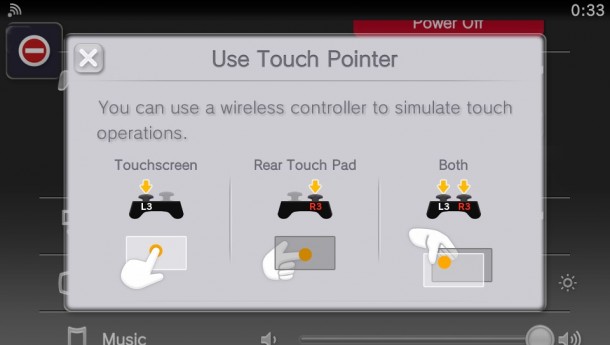
Controlling the games on the console is possible through connecting a PS Vita to the Vita TV; or by using a DualShock 3 controller – the DualShock 4 controllers available for the PS4 are not yet supported, but a software patch in the future will change this. One problem with this approach is the DualShock 3 has no touch controls like the PS Vita or the newer controllers, but many of the games that will be available on the Vita TV expect some sort of touch-screen input. Thankfully Sony have thought about this – sorry Wikipedia, your claim that “certain games are not compatible with PS Vita TV, such as those that are dependent on the system’s touch-screen, rear touchpad…” has just been proven false – through touch-screen emulation.
The Vita TV contains a virtual touch screen, which can be enabled in the console’s Options menu. When enabled, pressing R3 or L3 turns the thumbsticks into mouse pointers which you can use to “touch” the screen. Pressing R3 gives you two pointers for the front panel, L3 gives two for the back, and both R3 and L3 at the same time gives you two cursors pressing front and back at the same time. Some games have to be patched to support this feature – but if so, the Vita TV will make you aware of this and offer to automatically download the patch before you play.
Currently, there is no news for a Western launch of Vita TV – but we’d be surprised if it never happened. Stay tuned!
On the eve of his most terrible battle, the Time Lord is faced with a choice that will change the course of his life. The darkest of days are about to begin.
The Doctor has always been a man of secrets – and now they can be told ….
The precursor mini episode before the 50th anniversary extravaganza (on TV and in cinemas, 23rd Nov) episode introduces us to the War Doctor, played by John Hurt, the now revealed regeneration between Paul McGann (8th) and Christopher Eccleston (10th revised)
Nintendo have announced that Google will launch a new YouTube app for the 3DS and an updated app for the Wii U “later this month”.
The new Youtube 3DS app marks the first time Youtube videos will be directly available on a handheld Nintendo console. Users will be able to watch the videos on the larger upper screen while they browse the Youtube website on the lower touchscreen; and the app contains a simplified interface designed with the 3DS in mind to make finding videos, reading comments and other activities as straightforward as possible.
Meanwhile, the existing Wii U Youtube app is being updated to support off-TV viewing. After downloading the new update, Wii U owners will be able to move Youtube videos to the Gamepad to view on the go; and it’s even possible to view two different videos placing one on the TV and another on the Gamepad.
Coming soon, Nintendo is releasing a System Update for the Nintendo 3DS that will finally bring Nintendo Network IDs to the 3DS as standard. As well as offering improved networking features for future 3DS titles and the ability to use a name rather than a friend code to identify yourself online, Nintendo is also utilising the service to fulfil a common request from the fans: Combined balances.
A common request from those who have both a Wii U and a 3DS is whether it’s possible to combine the balances for eShop accounts on both consoles into a single, shareable balance. The idea is that if you had, say, £15 on the 3DS and £20 on the Wii U, why can’t we share the pot and make it £35 to share on both consoles rather than only be able too use what’s on each?
After an upcoming 3DS System Update, you will be prompted to create a Nintendo Network ID to identify yourself when using the 3DS to connect online in the future. This is basically a username you’ll use on that 3DS from now on; and you can register anything as long as no other 3DS has already registered the same name. If you have a Wii U, however, you already have a Nintendo Network ID there – which is where the clever part comes in. If you register the EXACT same ID on the 3DS as you have on the Wii U, the two will become integrated. Then balance information from both will be shared, creating a single, unified balance for both devices!
But be warned! The Nintendo 3DS will consider any Nintendo Network ID registered on any device as a new account, unless it finds an existing Wii U account. This means if you register a different NNID on the 3DS, you will NOT be able to combine it with the existing one you have on the Wii U. This is why it’s important to be exact. Should you wish to share the IDs – and the balances – across both devices, but the names you register are even a single character out. your 3DS may get linked with the wrong Wii U account or with no account at all, preventing you from using the new feature!
With the introduction of Nintendo Network to 3DS, another feature that’s closely integrated into the network will also be débuting. The Wii U’s home-grown social networking tool, the MiiVerse – which up until now has been exclusive to the home games console – will soon be introduced to the 3DS as well, making for a truly mobile networking experience. Some 3DS communities have already launched; with more to join them over the coming days according to Nintendo – so keep your eyes peeled.
Once again Nintendo surprise everyone by announcing today another Nintendo Direct, which went live at 4pm UK Time. Over the next 30 minutes, plenty of info was revealed about upcoming Wii U and 3DS titles both known and unknown; but the bulk of the time (the initial eight minutes, longer than any other game discussion) went to The Legend of Zelda: A Link Between Worlds. Releasing in Europe in just nine days time (November 22), Nintendo chose today to launch a brand new trailer demonstrating the game. Following this, Nintendo took time to discuss many facets about the game…
New Characters
…Starting with some of the new characters you’ll meet. One important new character is a witch called Irene. Though she’s seen flying overhead at the start of the game, soon enough she introduces herself to you with a story about how, despite being a witch, she has a lot of bad luck herself and was informed that if she aided someone green, she could change her fortune. As a result – and somewhat begrudgingly – Irene offers her services to you.
What services? Well, how about quick transport? Homaging old ideas such as the Recorder whistle that allowed Link to move to another area quickly from the original Zelda titles, Irene offers Link rides on her magic broom to different areas of the game. You first have to unlock a location for the broom to reach by finding and interacting with Weather Vanes located in appropriate areas; but once this is done, at most points in the game you can touch a bell icon on the 3DS touch screen and select a Vane to be taken to. Irene will then arrive – often complaining – and fly you to your chosen destination. Interestingly, the Broom can even travel to the “Dark World” version of Hyrule (what, so “A Link Between Worlds” didn’t tell you there would be a dark world?) and even pick him up and take him to locations between both worlds – although it appears Irene does not ride the broom while in the Dark World – so it seems her broom really IS magic!
Also making an early appearance is a character called Seres, who is introduced as the daughter of Hyrule Sanctuary’s Priest. A gentle soul with a pretty appearance, don’t expect to spend time with her for long – meeting Yuga, your nemesis, at the start of the game, she is magically turned into a portrait on the wall and trapped there, creating the game’s plot.
New Items and Abilities
Of course, she’s not alone – Yuga also sends YOU into a portrait on the wall as well, before leaving to the dark world via a rift accessedvia the castle’s wall. But the Triforce piece within link lets him free himself from the portrait and back into his physical, 3-dimensional form – and this unlocks the “flatten yourself against the wall and scale it” feature that we’ve seen already and forms a key part of much of the game’s puzzles and dungeons.
Another new feature revealed today might be familiar to long-term Zelda fans. At some point in the game you will pick up an item called Zora’s flippers – yup, you know where this is going don’t you? – and gain the ability to swim and dive in water. No news yet as to the purpose of this feature (although all of us at Sanitarium Towers expect to see it featuring in at least a few puzzles or dungeons – just no Water Temple please!); but Shibata DID give us a hint as to a side quest involving the water. During your swim around Hyrule you may find a cryptic message in a bottle, referencing a man who loves the taste of premium milk. As it turns out, Hyrule now has its own Milk bar, like those seen in more recent Zelda titles. Ask the owner about premium milk and he’ll wonder how you found out about it; then tell you about a man who always used to order it every day before taking trips up the mountains, but who recently disappeared.
Streetpass Gameplay
Of course, it wouldn’t be a 3DS game without taking advantage of 3DS features – and one interesting new Gameplay feature being introduced in A Link Between Worlds involves special battles using StreetPass. Introduced to you by a kind, elderly fellow affectionately called “Gramps“, you will be able to create your own shadowy version of Link to share. Your Shadow Link will have the number of hearts and the basic equipment of your real Link character at the time of creation, plus you can specify another item of equipment for it to use (interestingly, there appear to be TWO equipment slots, but only one is used in the Trailer) – the equipment and the number of hearts your Shadow Link has determines a bounty that will be placed on its head.
After saving your Shadow Link, the next time you tag someone on StreetPass who also has the game, your Shadow Link will be sent to their game; and you’ll receive theirs. Gramps will be able to tell you if a new one has arrived in your game; soon after, their Shadow Link will appear in specific places in your Game World – and you can talk to them and choose to fight them in a special one-on-one battle! Defeating the Shadow Link sent to your game will earn you the bounty attached to them, which will be an amount of Rupees from 30 to – well, who knows? What’s more, there’s no penalty to losing – so StreetPass often and keep getting new challenges to fight and more bounties to gain!
One more thing…
During the Trailer, Link is seen acquiring a Bow from Ravio’s store – the place where all essential equipment can be rented and eventually bought for use in future dungeons. However, Ravio doesn’t charge for the rental. Instead he’s seen to say, “Normally I’d charge a rental fee, but I’ll lend it to you for free. This time, anyway.” Could this mean you don’t necessarily have to pay to acquire all the equipment in the game?
As mentioned earlier, The Legend of Zelda: A Link Between Worlds will launch in Europe on November 22nd – but if you’re a true Zelda fan and have the Rupees cash to burn, you won’t want JUST the game, will you? Also launching that day is the limited edition Link Between Worlds Nintendo 3DS XL Bundle, which alongside a digital copy of the game will also include the Golden, black-backed, special design Zelda 3DS XL. Shiny!
Finally, if you can’t wait nine days to find out more about Link Between Worlds, head to Nintendo’s Instagram page – http://instagram.com/nintendo – where today and regularly until the game’s launch, Nintendo will be releasing a total of four quick 15-second trailers offering more teasers in the run up to the game’s official launch. Oh Nintendo, you do spoil your fans…









 With the introduction of Nintendo Network to 3DS, another feature that’s closely integrated into the network will also be débuting. The Wii U’s home-grown social networking tool, the MiiVerse – which up until now has been exclusive to the home games console – will soon be introduced to the 3DS as well, making for a truly mobile networking experience. Some 3DS communities have already launched; with more to join them over the coming days according to Nintendo – so keep your eyes peeled.